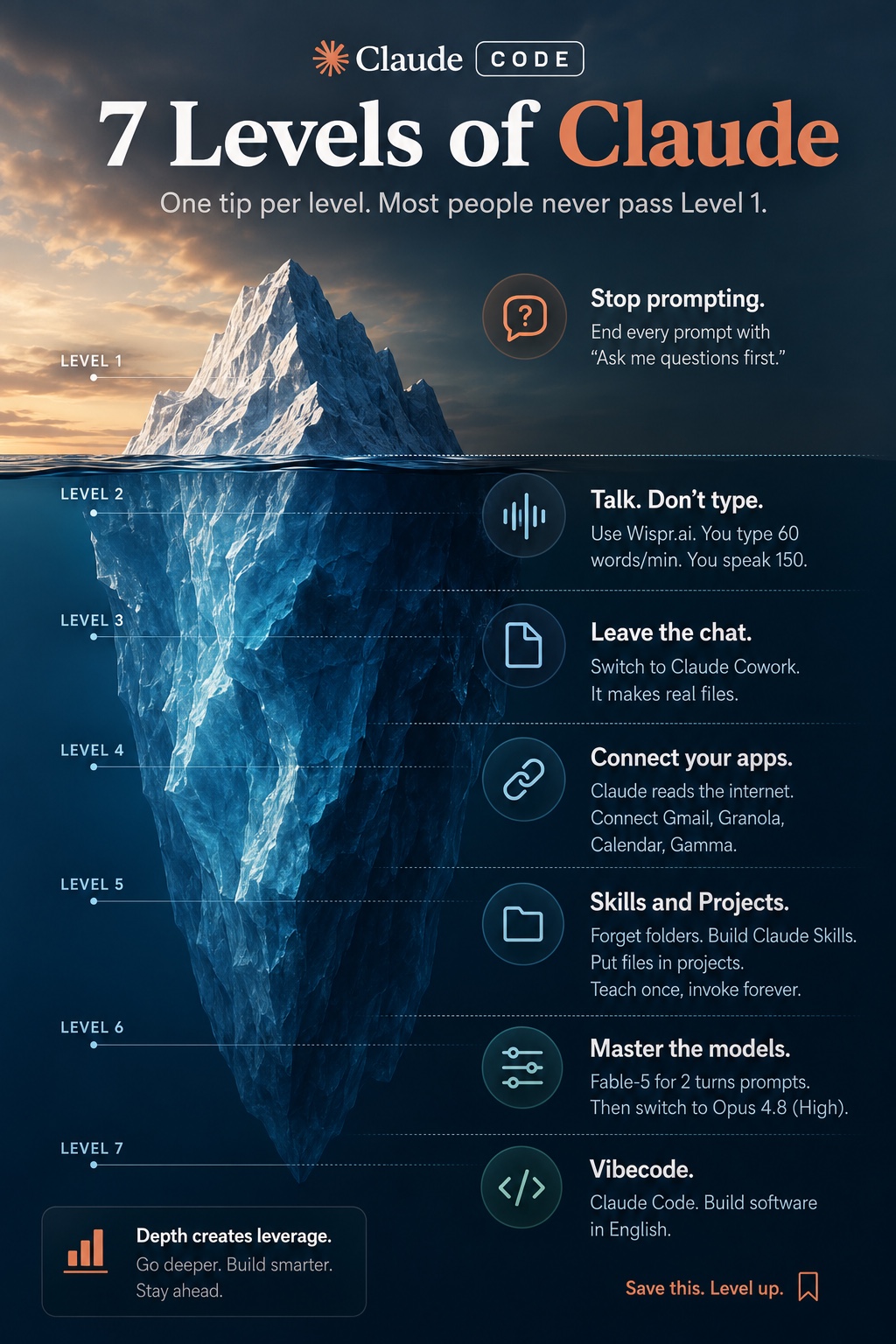
Level 1 — Stop prompting. Start briefing.
The shift
You have been treating the model like a search engine: one question in, one answer out. Search engines have no follow-up questions. Claude does, and it will not ask them unless you give it permission.
The output feels generic because your input was generic. The model filled the gaps with the statistical average of the internet, which is exactly what "generic" means.
The move
Add one sentence to the end of your prompt: "Ask me questions first."
That single line flips the direction of the conversation. Instead of guessing, the model interviews you: who is this for, what have you already tried, what does the constraint look like, what does "good" mean here. You answer five or six questions. Then it writes.
The output stops sounding like it was written for everyone, because it no longer was.
Three refinements that compound:
- Cap the questions. "Ask me up to 6 questions, one at a time." One at a time matters — a wall of ten questions gets answered badly.
- Ask for the missing piece, not the obvious one. Add: "Only ask what you genuinely cannot infer from what I have already told you."
- Make it show its work. Before the final output: "Summarise back what you understood, then wait for my go-ahead."
That last step catches misunderstandings while they cost you thirty seconds instead of three drafts.
Copy this
I need [deliverable] for [audience].

Context: [2-4 sentences of what you actually know]

Before writing anything, ask me up to 6 questions, one at a time,
about the things you genuinely cannot infer from the above.
Then summarise what you understood and wait for my go-ahead.
And the universal upgrade for any prompt you were about to send:
[your normal prompt]

Ask me questions first.
Unlocked when
You send a prompt and the first thing you get back is a question, not an answer — and you notice you are getting better output from shorter prompts than you used to write.
Level 2 — Talk, don't type.
The shift
You type around 40 to 60 words a minute. You speak at 130 to 150. That is not a small delta — it is roughly triple.
But the real gain is not speed. It is that typing makes you compress. When writing costs effort, you cut context to save keystrokes, and context is exactly what the model needed. Speaking is cheap, so you ramble — and rambling is a fantastic prompting technique. The tangent you would never have typed is often the detail that made the answer good.
The move
Use dictation for every prompt longer than two lines.
- Mac: press the dictation key (or Fn twice) — system-wide, works in any input field
- iPhone / Android: the microphone in the keyboard, or the mic button in the Claude app
- Desktop / browser: the Claude mobile and desktop apps have voice input built in; on the web, system dictation works in the chat box
Then stop editing yourself. Speak for 60 to 90 seconds. Say the background, the false starts, the "actually wait, the real problem is". Do not clean it up. The model handles messy input far better than it handles thin input.
If you are self-conscious about the transcript being a mess, close your eyes and add one line at the end: "That was dictated, so ignore the filler and the false starts."
Copy this
Say this out loud, do not type it:
Okay so what I'm trying to do is [the goal].
The background is [everything you know, in whatever order it comes out].
What I've already tried is [attempts].
What I'm worried about is [the real anxiety].
What I actually need from you is [deliverable].
That was dictated — ignore the filler.
Ask me questions first.
Notice that Level 1 and Level 2 stack. Dictation gives you a richer brief in less time; "ask me questions first" cleans up whatever you left out.
Unlocked when
Your average prompt is over 100 words, it took you 45 seconds, and you did not resent writing it.
Level 3 — Leave the chat box.
The shift
The chat window is the demo, not the product.
If your workflow is "ask → read → copy → paste into the real document → reformat", you are doing the last three steps by hand for no reason. The model can produce the finished artefact: an actual .xlsx with working formulas, a .docx with your headings, a slide deck, a PDF, a cleaned CSV, a chart.
The tell that you are stuck at Level 3 is receiving a description of a spreadsheet instead of a spreadsheet.
The move
Stop asking for content. Start asking for files.
- Upload the mess. Drag in the raw export, the PDF contract, the 40-page report, the screenshot of the dashboard. You do not need to tidy it first — tidying it is the job.
- Name the output format explicitly. "Give me this as an Excel file", "produce a .docx", "output a CSV I can import".
- Specify the structure, not the prose. Columns, tabs, headings, page count. The more skeletal detail you give, the less rework.
- Iterate on the file, not the chat. "Add a column for margin", "make tab 2 a summary that pulls from tab 1". It edits and re-issues the file.
Where this pays off fastest: turning a messy CSV export into a clean model, converting a long PDF into a structured summary table, building a recurring report template once and refilling it monthly, extracting every commitment and date out of a contract into a tracker.
Copy this
Attached is [the messy thing].

Produce an actual Excel file with:
- Tab 1 "Raw": the cleaned source data, one row per [unit]
- Tab 2 "Summary": [the metrics you care about], with live formulas
  referencing Tab 1, not pasted values
- Formatting: headers bold, currency as [currency], dates as YYYY-MM-DD

If anything in the source is ambiguous, list your assumptions at the
top of Tab 2 rather than guessing silently.
The "live formulas, not pasted values" line is the difference between a file you can reuse next month and a screenshot with extra steps.
Unlocked when
Your last three sessions ended with you downloading something, not selecting text and hitting copy.
Level 4 — Connect your apps.
The shift
Up to here, the model only knows what you paste in. That ceiling is invisible until you cross it.
Connect your inbox, calendar, drive and notes, and the request changes shape entirely. "Prep me for tomorrow" is a useless prompt against an empty context window. Against your actual week it is a briefing document: who you are meeting, what you last said to them, what you promised, what is still open.
You stop being the copy-paste layer between your tools and the intelligence.
The move
Connect in this order — it maps to the order the value shows up.
- Calendar — instant. "What does tomorrow look like and what do I need to prepare?"
- Email — the biggest single jump. Threads carry the history and the commitments.
- Drive / documents — so it can reference the deck and the contract instead of asking you to paste them.
- Meeting notes / transcripts — turns every call into a searchable, actionable record.
Then build two standing rituals rather than ad-hoc questions:
- Morning brief. One prompt, run daily, that reads today's calendar and yesterday's inbox and tells you what actually needs you.
- Weekly loop-close. Every Friday: what did I promise this week and not deliver, and who is waiting on me.
A word on judgement: connected apps mean the model reads real correspondence. Before you connect a shared or client inbox, check what your agreements and your company policy allow. Read access to your own mail is one decision; read access to a mailbox other people believe is private is a different one.
Copy this
The morning brief, saved and reused daily:
Read today's calendar and the last 24 hours of my inbox.

Give me:
1. Each meeting today — who, what it is about, and the one thing
   I should know going in, based on our previous threads
2. Anything I committed to in writing that is now due or overdue
3. Emails where someone is blocked waiting on me, ranked by how
   long they have waited
4. What I can ignore entirely today

Be blunt. If something looks like it does not need me, say so.
The Friday close:
Look at everything I sent this week. List every commitment I made
with a date or an implied deadline, whether I delivered it, and who
is still waiting. Then draft the three follow-ups I most owe.
Unlocked when
You have asked a question you could not have answered yourself in under ten minutes of clicking around, and got it back in twenty seconds.
Level 5 — Skills and projects. Stop repeating yourself.
The shift
If you explain your tone of voice, your customer, your format and your constraints every single morning, you are paying the setup cost of your own job on a daily loop.
Levels 1 to 4 improved individual conversations. Level 5 is where the improvement persists. You teach it your format once and it holds — across sessions, across weeks, across every future request of that kind.
This is the level where people stop saying "I use AI sometimes" and start saying "this is how we work".
The move
Two mechanisms, used for two different things.
Projects hold context: the durable facts about a workstream. One project per real area of your work — not one giant project called "work". Inside each, put the things you would otherwise re-paste: positioning, ICP, tone rules, pricing, key documents, the decisions already made and why.
Skills hold process: a repeatable procedure with its own rules. "Write our weekly customer update" is a skill. It knows the sections, the tone, the length, the things we never say. You invoke it and get output that already matches house style.
The build sequence that actually works:
- Notice the repetition. For one week, note every time you find yourself re-explaining something. That list is your backlog.
- Do it manually once, well. Get one output you are genuinely happy with.
- Reverse-engineer it. "Look at what we just produced. Write the instructions that would let you reproduce this quality without me steering. Include what to avoid."
- Save it. Project instructions or a skill.
- Refine on contact. Every time the output is off, do not fix it inline — fix the instruction. Two or three rounds and it stops being off.
Step 5 is the one people skip, and it is the one that compounds.
Copy this
Turning a good output into a permanent asset:
That last output is exactly right.

Write the instruction set that would let you reproduce that quality
on a new input without me steering you. Include:
- The structure and why each section exists
- The voice rules, stated as rules not adjectives
- What to never do — the specific failure modes you avoided
- The inputs you need from me each time

Format it so I can paste it straight into project instructions.
A project brief skeleton worth filling once:
WHO WE ARE: [one paragraph]
WHO WE SERVE: [ICP, specific enough to exclude people]
HOW WE SOUND: [3-5 rules, e.g. "no em dashes", "never say
  'revolutionary'", "concrete numbers over adjectives"]
WHAT WE'VE DECIDED: [decisions already made, so it stops relitigating]
NEVER: [the list that saves you the most editing]
Unlocked when
You start a new session on a familiar task and the first draft is already 80% right, with no context pasted in.
Level 6 — Master the models.
The shift
Sending every request to the same model is like doing every journey in the same gear.
There is a fast model built for volume and quick turns, and a heavy model built for the work where being right matters more than being quick. Using the heavy one for "reformat this list" wastes your time and your quota. Using the fast one for "pressure-test this pricing decision" wastes something more expensive — you get a confident, shallow answer and you act on it.
The skill is not knowing which model is best. It is knowing which model this task is.
The move
Sort every request into one of two buckets before you send it.
Fast model — when you already know what right looks like and you just need the labour done:
reformatting, extracting, summarising something you will read anyway, drafts you will heavily rewrite, bulk repetitive passes, quick lookups.
Heavy model — when you are going to act on the output:
strategy and trade-offs, anything with money or legal exposure, multi-step reasoning, debugging something you have already failed to fix, code you will ship, writing that goes out under your name, "tell me what I am getting wrong".
Two habits on top:
- Extended thinking for the hard ones. When the task genuinely has multiple interacting constraints, let it think longer. The difference is most visible on debugging, planning and anything where the first plausible answer is usually wrong.
- Escalate deliberately. If the fast model's answer feels thin, do not argue with it. Re-run the same brief on the heavy model. Two minutes, completely different output.
The failure mode to watch for: the fast model is fluent, so a shallow answer does not feel shallow. Fluency is not depth. If the stakes are real, escalate before you commit, not after.
Copy this
A pre-flight check for anything consequential:
Before you answer: what would make this answer wrong?

Give me the three assumptions you are making that I have not
verified, and what changes if each one is false. Then answer.
The escalation move, run on the heavy model:
Here is a brief and the answer I got: [paste both].

Pressure-test it. Where is it thin, what did it miss, what would
someone who does this professionally say is naive about it?
Then give me the version that survives that critique.
Unlocked when
You catch yourself switching models mid-conversation because the task changed, without thinking about it.
Level 7 — Vibecode. Describe the tool, get the software.
The shift
Every level so far made you faster at work that already existed. This one changes what is possible at all.
There is a category of tool you have wanted for years and never built, because building it meant either learning to code or paying someone. A dashboard that pulls your three numbers into one place. A booking page that matches your brand. An internal tool that does the one weird thing your business does. A calculator for your specific pricing model.
That category is now an afternoon.
The move
The instinct is to describe the app. The instinct is wrong — that gets you a generic app.
Describe the problem and the person, then let it propose the build:
- State the pain, not the feature. "Three people re-key the same numbers into a sheet every Monday and it is wrong by Wednesday" beats "build me a dashboard".
- Get it to spec before it builds. "Ask me questions first" applies with more force here than anywhere else. Ten minutes of interview saves a rebuild.
- Ship the ugly version. One screen, one job, real data. Not the roadmap.
- Use it for a week before you extend it. Almost everything on your original feature list turns out not to matter.
- Extend by complaint. "When I do X it does Y and it should do Z." That is the entire iteration loop.
What is genuinely in reach: internal dashboards and trackers, calculators and quoting tools, booking and intake forms, data cleaners, small client-facing microsites, prototypes you show instead of describe.
What still needs a professional: anything holding payment details or personal data at scale, anything with a real security surface, anything you will bet the company on. Vibecoding gets you to a working thing fast. It does not absolve you of asking whether the thing is safe to put in front of customers. Prototype freely; get review before real data goes in.
Copy this
I want to build a tool. Do not write any code yet.

The problem: [who suffers, how often, what it costs them today]
Today they solve it by: [the current painful workaround]
Success looks like: [the one observable change]

Interview me until you could build the simplest possible version
that solves that — one screen, one job. Ask one question at a time.
Then show me the spec and wait for my go-ahead.
The iteration loop, which is the whole job after v1:
When I [action], it [what happens]. It should [what you wanted].
Fix that one thing and change nothing else.
Unlocked when
Something you built is being used — by you every week, or by someone else at all.
The whole thing on one page
| Level | The shift | The one move |
|---|
| 1 | Briefing beats prompting | End with "ask me questions first" |
| 2 | Speech beats typing | Dictate anything over two lines |
| 3 | Artefacts beat answers | Ask for the file, not the content |
| 4 | Your context beats general knowledge | Connect calendar, then email |
| 5 | Persistence beats repetition | Turn a good output into an instruction set |
| 6 | Fit beats power | Sort the task before you send it |
| 7 | Building beats searching | Describe the problem, not the app |
How to actually run this
One level per week, in order. Sunday evening, pick the level. Use it deliberately for five working days — deliberately meaning you notice when you fail to use it. Do not move on until the "unlocked when" test passes.
Seven weeks. That is the whole thing.
The people who get nothing out of documents like this read all seven levels in one sitting, feel informed, and change nothing on Monday. The test is not whether you understood Level 4. It is whether your calendar is connected by Friday.
FiscEdge Academy — Build with AI
More playbooks, tools and workflows for founders: academy.fiscedge.com
Weekly breakdowns of the AI and business news that actually affects operators, every Sunday.
This playbook is free to share. If someone forwarded it to you, get the rest of the series at academy.fiscedge.com.